
What is a use case? It is a structured description of how an actor interacts with a system to achieve a specific goal. Use cases help teams understand requirements, workflows, and expected outcomes in a clear and practical way.
When people build software, products, or business systems, they need to understand what users actually want to accomplish. A use case provides a structured way to describe those interactions. Instead of focusing only on technical features, it explains who interacts with a system, what they want to achieve, and how the system responds.
This approach is useful in software development, business analysis, project management, and requirements gathering. In this guide, you will learn the main elements of a use case, how it works, how to create one, and how it differs from related concepts such as user stories and scenarios.
How to Create a Use Case
Understanding what a use case is can help teams document system requirements more clearly.
A use case is a structured description of how an actor interacts with a system to achieve a specific goal. The actor can be a person, organization, another system, or an external device.
For example, consider an online shopping website. The customer is the actor, while the shopping website is the system. The interaction might involve searching for a product, adding it to a cart, entering payment information, and receiving an order confirmation.
A use case focuses on the interaction and expected outcome rather than explaining how the underlying software is programmed.
A Simple Example
Imagine an ATM withdrawal:
- A customer inserts a bank card.
- The ATM requests authentication.
- The customer enters a PIN.
- The system verifies the information.
- The customer enters a withdrawal amount.
- The system checks the account.
- The ATM provides the cash.
- The transaction is recorded.
This sequence describes an interaction between an actor and a system to achieve a specific goal.
Why Are Use Cases Important?
Use cases help teams understand requirements before or during system development. They provide a shared description that business and technical stakeholders can discuss.
Software Development
Development teams can use use cases to understand expected system behavior and the interactions that software must support.
Business Analysis
Business analysts can document business requirements and clarify how users or other systems interact with a process.
Project Management
Project managers can use documented requirements to improve communication between stakeholders and delivery teams.
Product Development
Product teams can identify key user interactions and determine what functionality they need to support.
Requirements Gathering
Use cases help transform broad requirements into specific interactions and expected outcomes.
System Design
They also help designers and developers understand system behavior before making implementation decisions.
Key Elements of a Use Case
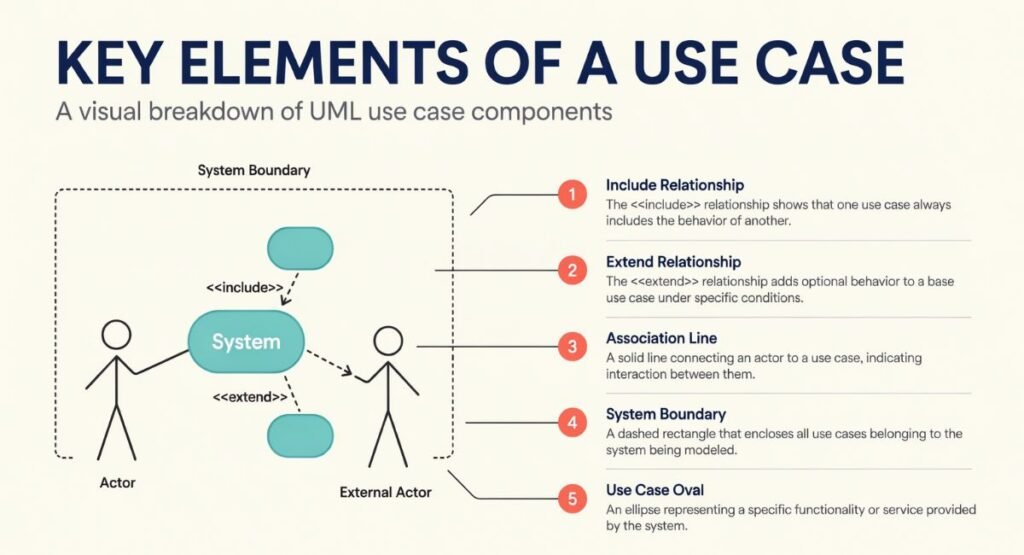
A well-structured use case normally contains several important elements.
| Element | Short Definition |
| Actor | The person, organization, system, or device interacting with the system |
| System | The product or system being interacted with |
| Goal | What the actor wants to accomplish |
| Preconditions | Conditions that should exist before the interaction starts |
| Trigger | The event that starts the interaction |
| Main Flow | The normal sequence of actions |
| Alternative Flow | A different but valid path through the process |
| Exception | An unexpected condition or failure that changes the normal flow |
| Postconditions | The expected state after the interaction finishes |
These elements do not always need to appear in exactly the same format. Teams may adapt the documentation style to their project and requirements.
How a Use Case Works in Practice
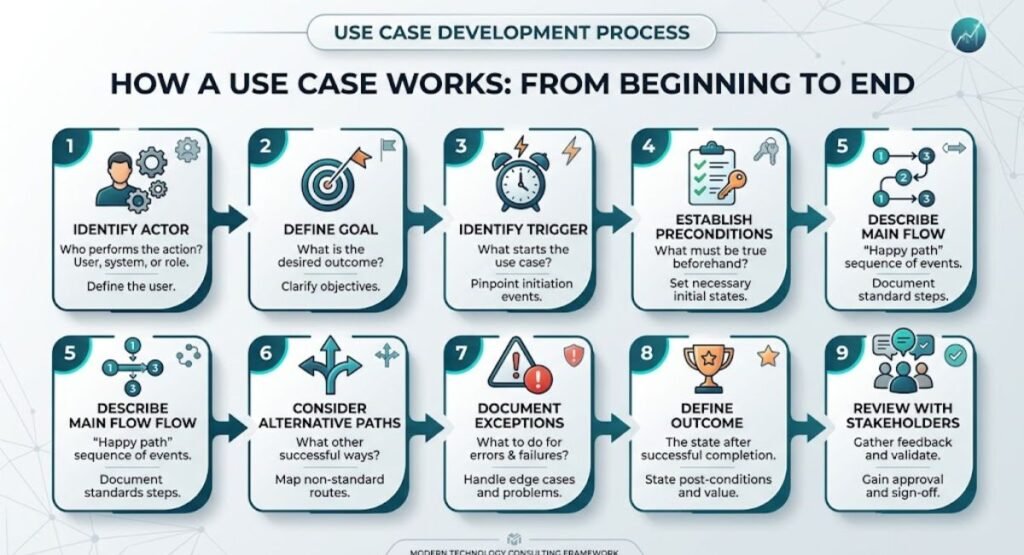
A typical interaction can be understood as a sequence of events.
In complex enterprise environments, these interactions may involve multiple infrastructure components and systems. Our guide to Enterprise IT Infrastructure Product Classification explains how enterprise infrastructure products can be organized and classified.
1. Identify the Actor
First, determine who or what interacts with the system. For example, the actor could be a customer, employee, administrator, payment service, or another application.
2. Define the Goal
Identify what the actor wants to accomplish. The goal should be specific enough to describe a meaningful outcome.
3. Identify the Trigger
Determine what starts the interaction. A customer clicking “Buy Now” could trigger an online purchase process.
4. Describe the Main Flow
Document the normal sequence of actions between the actor and system.
5. Consider Alternative Paths
Not every interaction follows the normal route. For example, a customer may choose a different payment method.
6. Document Exceptions
Describe what happens when something goes wrong, such as an invalid password, an unavailable product, or a failed payment.
7. Define the Outcome
Explain what should be true when the interaction ends successfully.
What Is a Use Case Example? Online Shopping

Consider a customer purchasing a product from an online store.
Actor: Customer
System: Online shopping platform
Goal: Purchase a selected product
Trigger: Customer selects the checkout option
Main Flow
- The customer reviews the shopping cart.
- The system displays the order details.
- The customer provides delivery information.
- The customer selects a payment method.
- The system processes the payment.
- The system confirms the order.
- The customer receives an order confirmation.
Alternative Flow
The customer may choose a different payment method if the preferred method is unavailable.
Exception
If the payment is rejected, the system should inform the customer and provide an appropriate next step.
Expected Outcome
A successful transaction creates an order and confirms it to the customer.
This example shows why documenting the normal path alone may not be enough. Real systems also need to account for alternative and exceptional situations.
Use Case vs User Story
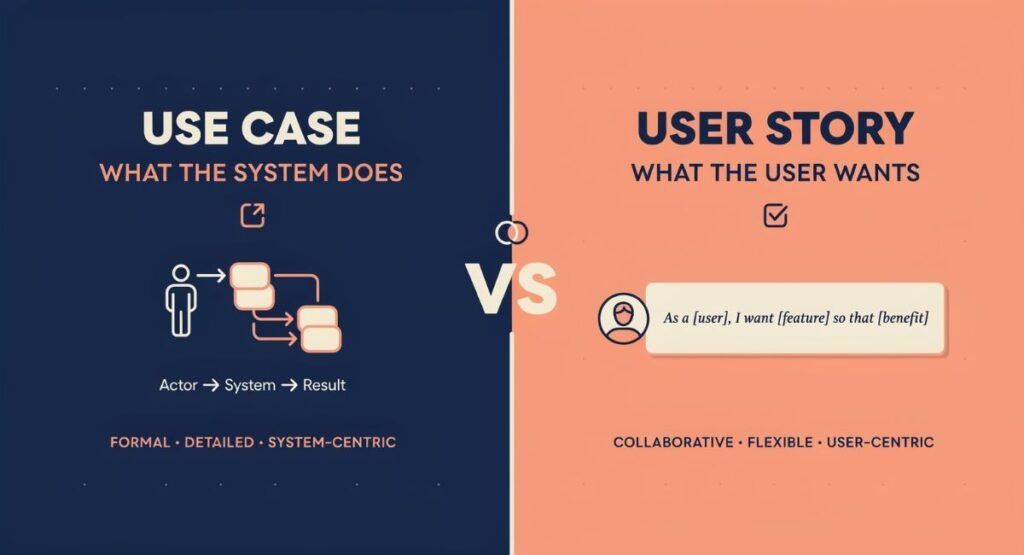
Use cases and user stories are both used to communicate requirements, but they generally serve different purposes and levels of detail.
| Factor | Use Case | User Story |
| Purpose | Describes an interaction and goal | Describes a user need or requirement |
| Detail | Usually more detailed | Usually concise |
| Structure | Actors, flows, conditions, outcomes | User, need, and benefit |
| Typical Users | Analysts, developers, testers, stakeholders | Agile product and development teams |
| Documentation | Structured interaction description | Short requirement statement |
| Main Focus | Interaction between actor and system | Value or need from the user’s perspective |
Neither format automatically replaces the other. A project may use both depending on its development approach and documentation needs.
Use Case vs Scenario
The terms are related, but they are not identical.
| Factor | Use Case | Scenario |
| Meaning | General description of an interaction for a goal | A specific path through an interaction |
| Scope | Can include multiple possible paths | Usually focuses on one path |
| Alternatives | Can document alternative and exception flows | Represents a particular situation |
| Purpose | Defines system behavior around a goal | Illustrates a specific example |
| Example | Customer completes an online purchase | Customer pays successfully using a card |
A use case can therefore contain several scenarios, including successful and unsuccessful paths.
Types of Use Cases
Different approaches may classify use cases in different ways. Common categories include the following.
Business Use Case
A business use case focuses on a business process or goal rather than only the behavior of a particular software system.
For example, processing a customer order could be considered a business-level interaction involving several activities and participants.
System Use Case
A system use case focuses more specifically on how an actor interacts with a software or technical system to achieve a goal.
Essential Use Case
An essential use case describes the interaction at a relatively technology-independent level. It focuses on the user’s intent and required behavior rather than a specific interface or implementation.
Real Use Case
A real use case can describe the interaction in terms of a particular implementation or interface. It may include details about how the system actually supports the interaction.
The terminology and classification can vary between organizations, methodologies, and analysis practices.
How to Create a Good Use Case
Creating useful documentation does not require complicated language. Follow a structured process.
- Identify the actor: Determine who or what interacts with the system.
- Define the goal: State the result the actor wants.
- Identify the trigger: Explain what starts the interaction.
- Establish preconditions: Record what must already be true.
- Describe the main flow: Document the normal interaction step by step.
- Add alternative flows: Include valid variations of the process.
- Document exceptions: Explain what happens when expected conditions are not met.
- Define the outcome: State the expected result after completion.
- Review with stakeholders: Confirm that the documented interaction reflects the actual requirement.
Keep the Language Clear
Each step should describe an understandable action or response. Avoid unnecessary technical implementation details unless they are important to the requirement.
For example, “The system confirms the customer’s order” is generally clearer than describing internal database operations that are not relevant to the interaction.
Common Mistakes to Avoid
Even a simple use case can become difficult to understand if it is poorly structured.
Making It Too Vague
A statement such as “The customer uses the website” does not clearly explain a goal or meaningful interaction.
Adding Unnecessary Technical Details
The document should explain required behavior without becoming an implementation manual.
Ignoring Alternative Scenarios
Real users do not always follow the expected path. Alternative flows can reveal important requirements.
Confusing Use Cases With User Stories
Although they are related, the two formats have different structures and purposes.
Using Unclear Actor Definitions
Actors should represent meaningful participants in the interaction rather than vague groups.
Focusing Only on System Functionality
A useful description should connect system behavior to an actor’s goal.
Writing Excessively Complicated Flows
Too much detail can make requirements difficult to review. Include enough information to communicate the interaction clearly without unnecessary complexity.
Benefits of Using Use Cases
A structured interaction description can provide several practical benefits:
- Improved communication: Gives technical and non-technical stakeholders a shared reference.
- Clearer requirements: Connects system behavior with user goals.
- Better planning: Helps teams identify the functionality that needs to be delivered.
- Improved testing: Provides scenarios that can help testers understand expected behavior.
- Risk identification: Alternative and exception flows can expose potential problems.
- Better documentation: Creates a reusable record of important system interactions.
- Stakeholder alignment: Makes requirements easier to review and discuss.
When Should You Use a Use Case?
Use cases are particularly useful when a project contains meaningful interactions between users and systems.
They can be valuable when:
- A system has multiple types of users.
- Requirements need detailed interaction flows.
- Stakeholders need a common understanding of system behavior.
- A business process contains alternative paths.
- Testing teams need clear behavioral requirements.
- A new system is being analyzed before development.
- Existing processes need to be documented or improved.
For a very small requirement, a detailed use case may not always be necessary. The appropriate documentation method depends on the project’s size, complexity, methodology, and stakeholder needs.
About the Author
Zain UL Abideen creates clear, search-focused content covering technology, business concepts, digital topics, and practical professional information. His approach focuses on useful structure, accessible language, and research-based content designed to help readers understand complex subjects more easily.
Conclusion
Use cases provide a practical way to describe interactions between actors and systems while keeping attention on specific goals and expected outcomes. They help teams understand requirements, communicate more clearly, and consider both normal and alternative paths through a process.
A good use case does not need to be complicated. By clearly identifying the actor, goal, trigger, flow, exceptions, and outcome, teams can create documentation that is easier to understand and apply throughout a project.
Understanding what a use case is helps teams describe system interactions, clarify requirements, and identify expected outcomes.
(FAQs)
What is the main purpose of a use case?
It describes how an actor interacts with a system to achieve a specific goal.
Who can be an actor in a use case?
An actor can be a person, organization, external system, or device that interacts with the system.
What is the difference between a use case and a scenario?
A use case can describe several possible interaction paths, while a scenario normally represents one specific path.
Are use cases only used in software development?
No, they can also support business analysis, requirements management, project planning, and process documentation.
Can a project use both use cases and user stories?
Yes, teams can use both when each format provides useful information for their requirements and workflow.