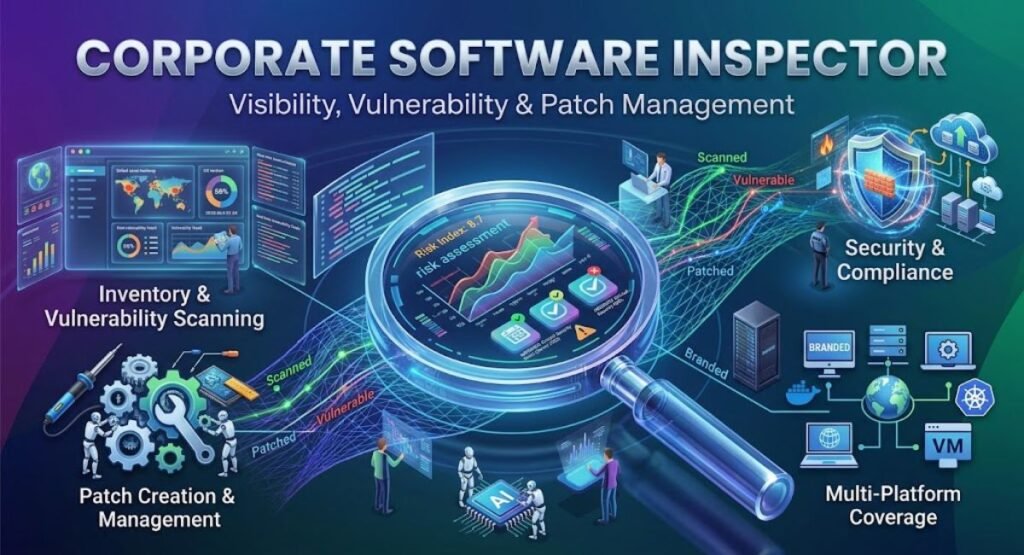
Corporate Software Inspector refers to enterprise software inspection, vulnerability detection, patch management, and software inventory. Organizations use software inspection processes to understand what applications are installed, identify outdated or vulnerable versions, and reduce security and compliance risks.
The term is also strongly associated with Flexera’s Corporate Software Inspector, a vulnerability and patch management solution that combines vulnerability intelligence, software scanning, patch creation, and integration with patch deployment tools.
For modern businesses, software inspection is important because companies often operate hundreds or thousands of applications across computers, servers, virtual machines, and other systems.
This guide explains what a corporate software inspector is, how it works, its main benefits, important features, limitations, and how businesses can use software inspection as part of a broader security strategy.
What Is Corporate Software Inspector?
A corporate software inspector is a security and software management solution designed to examine software installed across an organization’s IT environment.
Its primary purpose is to provide visibility into installed applications and help security or IT teams identify software that may be outdated, unsupported, unauthorized, or affected by known vulnerabilities.
In the traditional Corporate Software Inspector product, the technology was designed around vulnerability intelligence, vulnerability scanning, patch creation, and patch deployment integration.
In simple terms, a corporate software inspector helps an organization answer questions such as:
- What software is installed?
- Which version is being used?
- Which applications are outdated?
- Which applications have known vulnerabilities?
- Which systems require security updates?
- Is unauthorized software present?
A complete software inventory is also a recognized security practice. CIS recommends maintaining detailed information about software assets, including the software name, publisher, version, installation information, and authorization status.
How Does a Corporate Software Inspector Work?
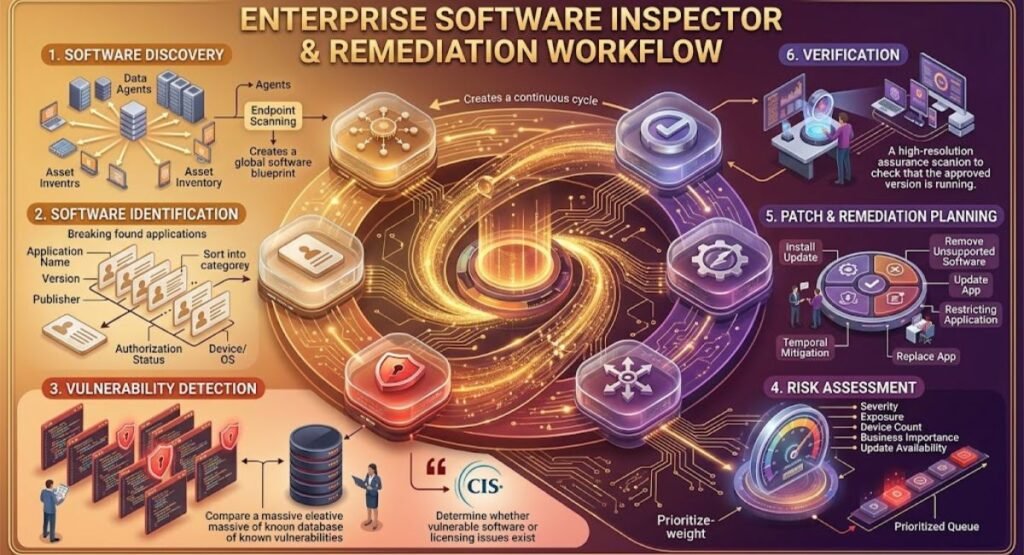
A corporate software inspector generally follows a structured process to discover software, compare it against security information, identify risks, and support remediation.
1. Software Discovery
The first step is discovering applications installed across corporate devices.
Depending on the solution, discovery may involve agents, endpoint scanning, inventory systems, or other enterprise management technologies.
The objective is to create a reliable picture of the organization’s software environment.
2. Software Identification
After software is discovered, the system identifies important information such as:
- Application name
- Version
- Publisher
- Installation information
- Device or endpoint
- Operating system
- Authorization status
This information helps IT teams understand exactly what is running inside the organization.
3. Vulnerability Detection
The next step is comparing discovered software against vulnerability intelligence.
This is important because attackers frequently target outdated software. CIS explains that maintaining software inventory helps organizations determine whether vulnerable software or licensing issues exist.
4. Risk Assessment
Not every software finding has the same level of importance.
A security team may prioritize findings based on factors such as:
- Vulnerability severity
- Exposure
- Number of affected devices
- Business importance
- Availability of a security update
Risk-based prioritization helps teams focus their limited time on the problems that matter most.
5. Patch and Remediation Planning
After identifying vulnerable applications, IT teams can determine the appropriate response.
Possible actions include:
- Installing a security update
- Updating the application
- Removing unsupported software
- Restricting an application
- Applying a temporary mitigation
- Replacing the application
The correct response depends on the organization’s security policy and operational requirements.
6. Verification
The final stage is checking whether remediation actually worked.
For example, if an outdated application was patched, the organization should verify that the affected endpoints are now running the approved version.
This creates a continuous cycle of discovery, assessment, remediation, and verification.
Corporate Software Inspector Features
A corporate software inspector can provide several capabilities that help organizations manage software risk.
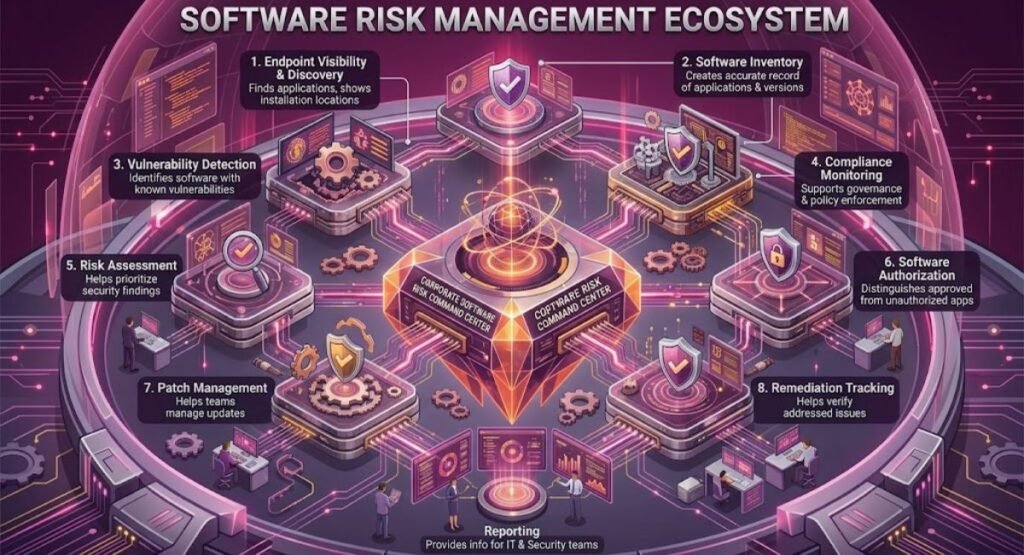
| Feature | Purpose |
| Software Discovery | Finds applications installed across corporate devices |
| Software Inventory | Creates a record of applications and versions |
| Vulnerability Detection | Identifies software associated with known vulnerabilities |
| Patch Management | Helps teams manage required software updates |
| Risk Assessment | Helps prioritize important security findings |
| Compliance Monitoring | Supports software governance and policy enforcement |
| Reporting | Provides information for IT and security teams |
| Endpoint Visibility | Shows where software is installed |
| Software Authorization | Helps distinguish approved and unauthorized applications |
| Remediation Tracking | Helps verify whether security issues were addressed |
Organizations can also use business intelligence exercises to improve their ability to analyze software inventory data, identify patterns, and turn technical findings into useful business decisions.
A strong software inventory should contain enough information to identify each software asset accurately.
Why Is Corporate Software Inspection Important?
Software environments become difficult to manage as organizations grow.
A small company may have a few applications, while a large enterprise can have thousands of installations across multiple locations and operating systems.
Manual inspection becomes increasingly difficult in such environments.
Reduces Security Risk
Outdated software can contain known vulnerabilities.
Software inspection provides visibility that allows organizations to identify affected systems and take appropriate action.
Improves Software Visibility
You cannot effectively manage software that you do not know exists.
A reliable inventory gives IT teams a centralized view of applications, versions, and endpoints.
Supports Patch Management
Patch management depends on knowing which applications require updates.
A software inspection process can help identify outdated versions and connect those findings with remediation workflows.
Helps Control Unauthorized Software
Employees may install applications without going through formal IT approval.
This can create security, licensing, privacy, or support problems.
Software inventory and classification can help organizations identify applications that do not belong in the approved environment.
Supports Compliance
A documented software inventory can support internal controls, audits, and security governance.
CIS Control 2 specifically focuses on inventory and control of software assets and recommends maintaining detailed software information.
Corporate Software Inspector vs Traditional Antivirus
A corporate software inspector and antivirus software solve different problems.
Antivirus products primarily focus on detecting and blocking malicious software or suspicious activity.
A corporate software inspector focuses more heavily on software visibility, vulnerabilities, versions, patch status, and software management.
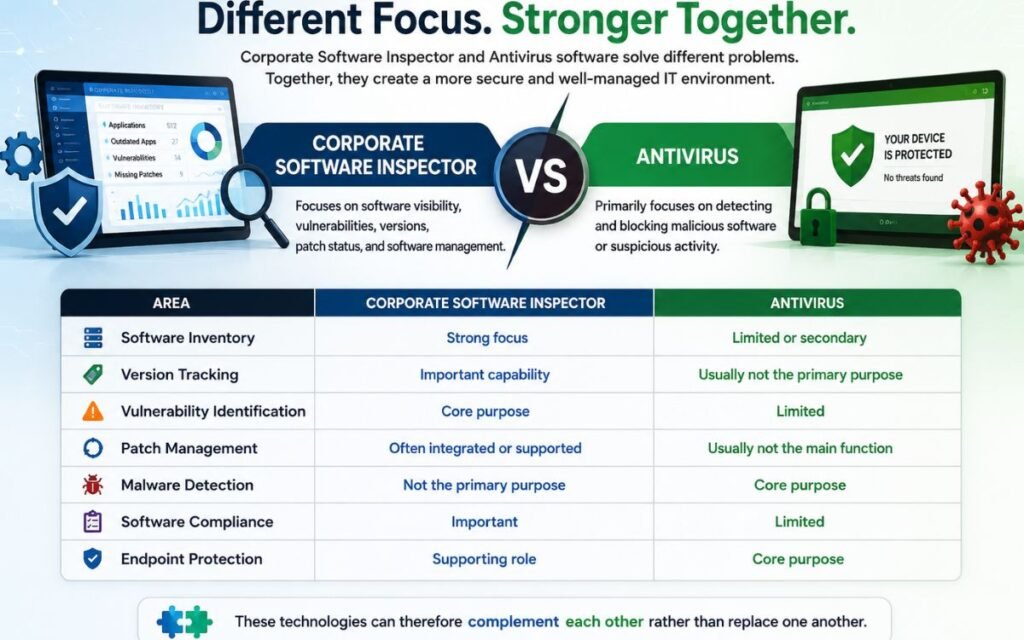
| Area | Corporate Software Inspector | Antivirus |
| Software Inventory | Strong focus | Limited or secondary |
| Version Tracking | Important capability | Usually not the primary purpose |
| Vulnerability Identification | Core purpose | Limited |
| Patch Management | Often integrated or supported | Usually not the main function |
| Malware Detection | Not the primary purpose | Core purpose |
| Software Compliance | Important | Limited |
| Endpoint Protection | Supporting role | Core purpose |
These technologies can therefore complement each other rather than replace one another.
Corporate Software Inspector vs Software Inventory Tools
Software inventory is one component of software inspection, but the two concepts are not always identical.
A broader corporate software inspection solution can go further by asking:
- Is this software vulnerable?
- Is the version supported?
- Is the application authorized?
- Does it require a patch?
- What should the security team do next?
Modern inventory platforms can also provide detailed install maps showing which devices have a particular product and version.
What Information Should a Corporate Software Inventory Include?
A useful inventory should contain enough information to identify and manage each application.
| Information | Why It Matters |
| Software Name | Identifies the application |
| Version | Helps determine whether an update is required |
| Publisher | Identifies the software vendor |
| Installation Date | Provides deployment history |
| Device | Shows where the application is installed |
| Operating System | Provides environment context |
| Authorization Status | Shows whether the software is approved |
| Business Purpose | Explains why the application is being used |
| Risk Level | Helps prioritize review |
| Support Status | Identifies unsupported applications |
| License Information | Supports software asset management |
| Last Review Date | Helps keep inventory current |
CIS guidance recommends maintaining detailed software inventory information and reviewing it regularly, rather than treating it as a one-time task.
Benefits of Using a Corporate Software Inspector
A well-managed software inspection process can provide several business and security benefits.
Better Security Visibility
Security teams gain a clearer understanding of the software environment.
Instead of relying on assumptions or outdated spreadsheets, teams can work with a more structured inventory.
Faster Vulnerability Response
When vulnerable software is identified, teams can determine which devices are affected and prioritize remediation.
This can reduce the time between vulnerability discovery and corrective action.
Improved IT Efficiency
Software inspection can reduce manual work and improve IT visibility, while structured portfolio management can help organizations manage competing initiatives, resources, risks, and business priorities.
Automated discovery can reduce the amount of manual work required to maintain software records.
CIS recommends using automated software inventory tools where possible to improve discovery and documentation.
Better Compliance Management
Organizations can use software records to demonstrate that applications are being monitored and controlled.
Reduced Software Sprawl
Software inspection can expose duplicate, unnecessary, unsupported, or unauthorized applications.
Removing unnecessary software can simplify IT operations and reduce management overhead.
Better Patch Planning
Instead of applying updates without understanding the environment, IT teams can identify affected systems and plan deployment more systematically.
Common Challenges in Corporate Software Inspection
Despite its benefits, software inspection is not completely automatic.
Organizations may encounter several challenges.
Incomplete Asset Coverage
If some endpoints are missing from the inventory process, the resulting information may be incomplete.
An inventory is only useful when it provides broad coverage of the environment.
Unknown or Unmanaged Software
Employees may install applications outside official IT processes.
These applications can become difficult to monitor.
Legacy Applications
Some organizations still depend on old applications that cannot easily be upgraded.
Replacing them may require significant planning, testing, or investment.
False Positives
Automated systems can sometimes produce findings that require human verification.
Security teams should investigate important findings before taking disruptive action.
Complex IT Environments
Large organizations may use multiple operating systems, cloud platforms, virtual machines, remote endpoints, and third-party applications.
Managing all of these environments requires careful integration and governance.
Best Practices for Corporate Software Inspection
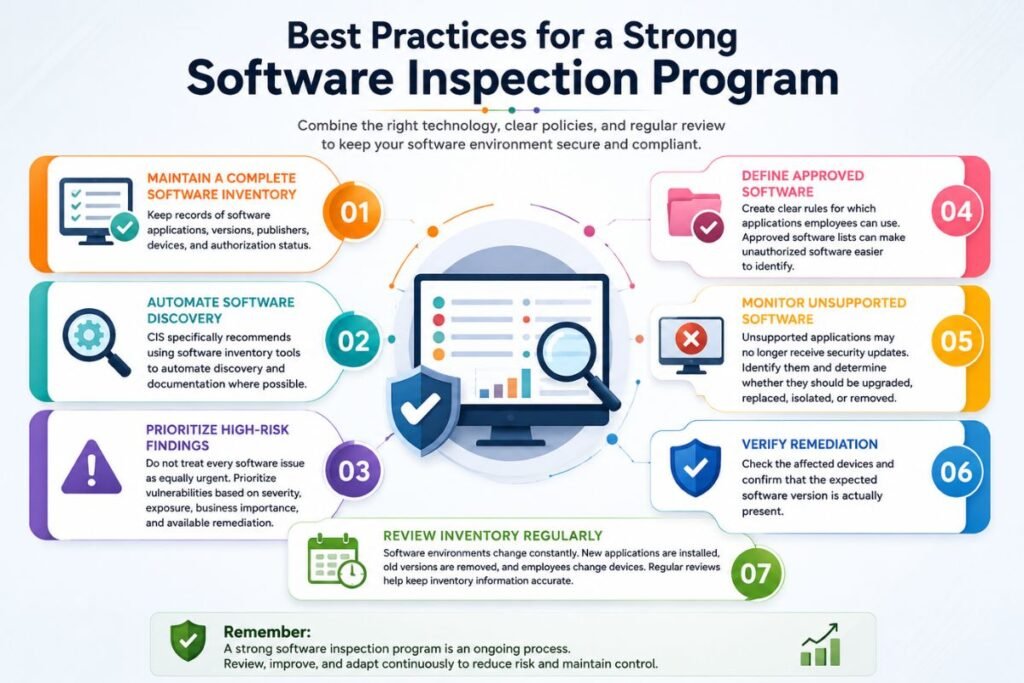
A strong software inspection program should combine technology with clear policies and regular review.
Maintain a Complete Software Inventory
Keep records of software applications, versions, publishers, devices, and authorization status.
Automate Software Discovery
CIS specifically recommends using software inventory tools to automate discovery and documentation where possible.
Prioritize High-Risk Findings
Do not treat every software issue as equally urgent.
Prioritize vulnerabilities based on severity, exposure, business importance, and available remediation.
Define Approved Software
Create clear rules for which applications employees can use.
Approved software lists can make unauthorized software easier to identify.
Monitor Unsupported Software
Unsupported applications may no longer receive security updates.
Organizations should identify them and determine whether they should be upgraded, replaced, isolated, or removed.
Verify Remediation
Check the affected devices and confirm that the expected software version is actually present.
Review Inventory Regularly
Software environments change constantly.
New applications are installed, old versions are removed, and employees change devices.
Regular reviews help keep inventory information accurate.
Corporate Software Inspector in Modern Enterprise Security
The concept of corporate software inspection has expanded as enterprise environments have become more complex.
Organizations now manage traditional desktop applications alongside cloud services, remote endpoints, virtual infrastructure, and large collections of third-party software.
This makes software visibility increasingly important.
A modern software management strategy should connect software discovery with vulnerability management, patching, asset management, and security governance.
The goal is not simply to create a list of applications. The goal is to understand what is running, determine whether it is acceptable, identify security risks, and take appropriate action.
A Simple Corporate Software Inspection Workflow
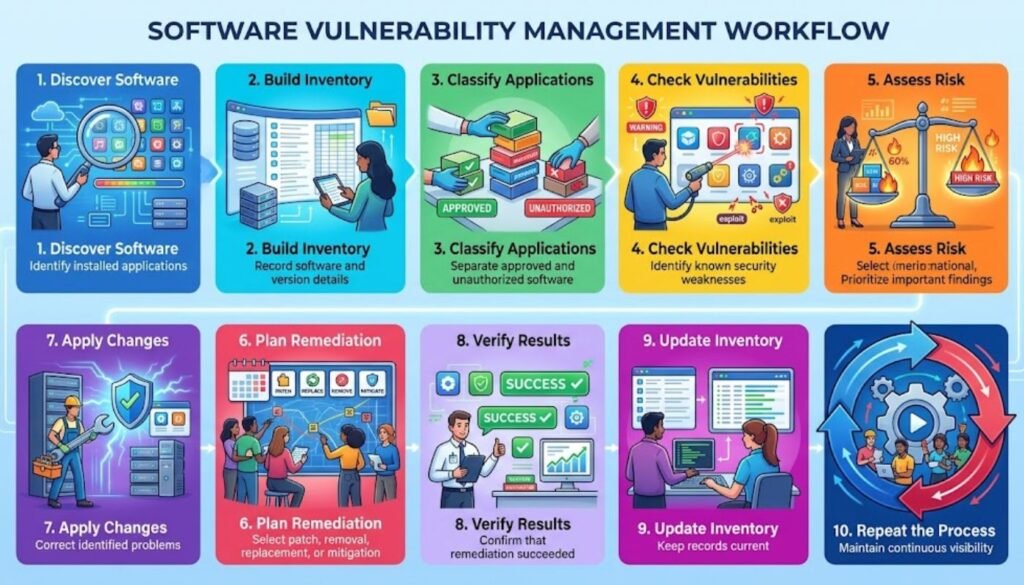
Businesses can use the following workflow as a practical starting point:
| Step | Action | Expected Result |
| 1 | Discover software | Identify installed applications |
| 2 | Build inventory | Record software and version details |
| 3 | Classify applications | Separate approved and unauthorized software |
| 4 | Check vulnerabilities | Identify known security weaknesses |
| 5 | Assess risk | Prioritize important findings |
| 6 | Plan remediation | Select patch, removal, replacement, or mitigation |
| 7 | Apply changes | Correct identified problems |
| 8 | Verify results | Confirm that remediation succeeded |
| 9 | Update inventory | Keep records current |
| 10 | Repeat the process | Maintain continuous visibility |
This workflow turns software inspection into an ongoing security process rather than a one-time audit.
Who Uses Corporate Software Inspection?
Several teams can benefit from software inspection.
IT Teams
IT departments use software inventory information to understand applications deployed throughout the organization and manage updates.
Cybersecurity Teams
Security professionals use software information to identify vulnerable applications and prioritize remediation.
Compliance Teams
Compliance professionals can use software records as evidence of software governance and control.
Software Asset Management Teams
SAM teams can use inventory information to support licensing, application standardization, and cost management.
Business Leaders
Executives can benefit from high-level reports showing major software risks, unsupported applications, and remediation progress.
What Skills Are Useful for a Corporate Software Inspector?
If the term is being used as a job function rather than a product name, the role may require a combination of technical, analytical, and communication skills.
| Skill | Importance |
| Cybersecurity Knowledge | Understand common software risks |
| Vulnerability Management | Identify and prioritize vulnerabilities |
| Software Inventory | Maintain accurate application records |
| Patch Management | Understand software update processes |
| Risk Assessment | Evaluate business impact |
| IT Administration | Understand enterprise endpoints |
| Compliance Knowledge | Support organizational controls |
| Analytical Thinking | Investigate software findings |
| Reporting | Communicate risks clearly |
| Attention to Detail | Detect inconsistencies and gaps |
The exact responsibilities depend on the organization and whether the role is focused on cybersecurity, software asset management, quality assurance, or IT auditing.
Is Corporate Software Inspector Still Relevant?
Yes, the underlying concept remains highly relevant even though software products and product names can change.
Flexera’s historical documentation identifies Corporate Software Inspector as a vulnerability and patch management solution.
Today, organizations continue to need the same fundamental capabilities: software discovery, inventory accuracy, vulnerability identification, patch management, authorization controls, and remediation tracking.
The name of a particular product may change, but the business requirement remains.
Conclusion
Corporate Software Inspector plays an important role in enterprise software security and management by helping organizations discover installed applications, identify outdated or vulnerable software, and support appropriate remediation. A well-maintained software inventory gives IT and security teams better visibility into their technology environment and helps them make informed decisions.
Modern organizations should treat software visibility as an ongoing security responsibility rather than a one-time task. By combining automated software discovery, vulnerability assessment, risk-based prioritization, patch management, and regular verification, businesses can reduce software-related risks and maintain a more secure, organized, and manageable IT environment.
FAQs
What is a corporate software inspector?
A corporate software inspector is a tool or process that discovers, assesses, and manages software across an organization’s IT environment.
What does Corporate Software Inspector check?
It checks installed software, versions, vulnerabilities, patches, and authorization status depending on the system.
Is Corporate Software Inspector an antivirus?
No, it focuses mainly on software visibility, vulnerability detection, and patch management rather than malware protection.
Why is software inventory important?
Software inventory helps organizations identify installed applications and detect potential security, compliance, and management issues.
Can software inspection detect outdated applications?
Yes, it can identify outdated applications by comparing installed versions with available software and vulnerability information.