
Managing a project involves more than completing tasks and meeting deadlines. Project teams also need to monitor potential risks, important assumptions, existing problems, and dependencies that can affect progress.
A RAID report provides a structured way to organize this information in one place. It helps project teams identify what could go wrong, understand current problems, confirm important assumptions, and monitor activities or resources that the project depends on. This guide explains the main components, benefits, structure, examples, best practices, and practical steps for creating one.
What Is a RAID Report?
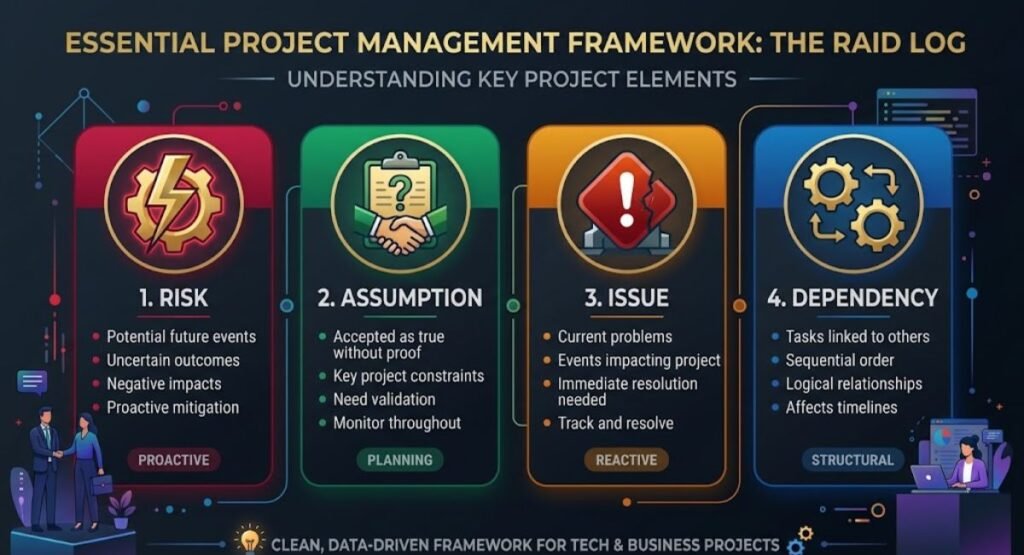
A RAID report is a project-management document used to identify, record, monitor, and manage important factors that can influence a project. RAID commonly represents Risks, Assumptions, Issues, and Dependencies.
Each category focuses on a different type of project information:
- Risk: A possible future event that could affect project objectives.
- Assumption: Something the team accepts as true when planning the project.
- Issue: A problem that has already occurred and needs attention.
- Dependency: Something the project relies on, such as another task, team, person, system, or external organization.
The exact meaning of RAID can vary between organizations. Some teams use variations of the acronym that include actions or decisions. Therefore, project teams should define the terminology they use at the beginning of a project.
RAID Report Components
Understanding the four components makes it easier to maintain an effective project record.
Risks
A risk is an uncertain event or condition that may affect a project in the future. Risks can relate to schedules, budgets, resources, technology, suppliers, quality, or other project factors.
A risk is an uncertain event or condition that may affect a project in the future. Risks can relate to schedules, budgets, resources, technology, suppliers, quality, or other project factors. For a broader approach to identifying, assessing, and managing project risks, see our guide to Composite Risk Management.
For example, a software project may face a risk that a third-party system will not be ready before integration testing.
A team can respond by identifying the risk early, assessing its potential effect, assigning an owner, and preparing a suitable mitigation or response.
Assumptions
An assumption is something the project team considers to be true for planning purposes without having complete confirmation.
For example, a team may assume that a required subject-matter expert will be available during a particular project phase.
Documenting assumptions is important because an incorrect assumption can affect schedules, resources, costs, or deliverables. When an assumption changes, the team can review its potential impact and take appropriate action.
Issues
An issue is a problem that has already happened or is currently affecting the project. Unlike a risk, an issue is not merely a possibility.
For example, if a required software license has expired and the team cannot continue testing, that is an issue.
Issues should normally have an owner, status, priority, action, and target resolution date. This makes it easier to track progress toward resolution.
Dependencies
A dependency occurs when one part of a project relies on another activity, person, team, resource, or external party.
An example of an internal dependency is a development team waiting for approved designs from a design team. An external dependency could involve waiting for a supplier to deliver equipment.
Tracking dependencies helps teams understand relationships between activities and identify where delays could affect other work.
RAID Report vs RAID Log
The terms RAID report and RAID log are often used interchangeably. In some organizations, however, a report may provide a summarized view for stakeholders while a log may contain more detailed working information.
The terminology and format depend on the organization and project.
| Feature | RAID Report | RAID Log |
| Purpose | Provides an organized view of key project concerns | Records and tracks individual items |
| Format | May be summarized for reporting | Often maintained as a detailed working register |
| Main use | Project review and communication | Ongoing tracking and management |
| Updates | Updated according to reporting needs | Usually updated as items change |
| Audience | Project managers and stakeholders | Project team and project managers |
The important point is not the name but whether the information is clear, current, and useful for project management.
Why Is a RAID Report Important?
A well-maintained project register can provide several practical benefits:
- Better visibility: Keeps important project concerns in one organized location.
- Early risk identification: Helps teams recognize potential problems before they become active issues.
- Clear ownership: Shows who is responsible for monitoring or resolving an item.
- Improved communication: Gives team members and stakeholders a shared view of important concerns.
- Better tracking: Makes it easier to monitor status, actions, and deadlines.
- Faster escalation: Helps identify matters that may require management attention.
- Improved accountability: Makes responsibilities more visible.
- Better decision-making: Gives project discussions a structured information base.
A RAID report does not guarantee project success. Its value depends on the quality of the information recorded and how consistently the project team uses and updates it.
What Should a RAID Report Include?
The structure can vary according to project requirements, but several fields are useful for most projects.
| Field | Purpose | Example |
| ID | Identifies the item | R-001 |
| Type | Shows the RAID category | Risk |
| Description | Explains the concern | Vendor delivery may be delayed |
| Owner | Identifies responsibility | Project Manager |
| Priority | Indicates importance | High |
| Status | Shows current state | Open |
| Response | Describes planned action | Confirm backup supplier |
| Due Date | Shows the target date | 15 October |
| Review Date | Shows when the item should be reviewed | Weekly |
The objective is to provide enough information for someone to understand the item and its current position without creating unnecessary administrative work.
How to Create a RAID Report
Creating one does not need to be complicated. A practical process can follow these steps:
- Define the project scope: Understand the project’s objectives, deliverables, timeline, and major constraints.
- Identify risks: Record potential events that could affect project objectives.
- Document assumptions: Write down important assumptions used during planning.
- Record current issues: Capture problems that are already affecting the project.
- Identify dependencies: Record work, resources, systems, or people that the project relies on.
- Assign owners: Give each active item a person responsible for monitoring or managing it.
- Set priorities: Identify which items require greater attention.
- Add response actions: Define what should be done to manage each item.
- Set review dates: Establish when items should be reviewed.
- Update regularly: Keep the information current as the project develops.
This process can be adapted to small projects as well as larger programs.
RAID Report Example
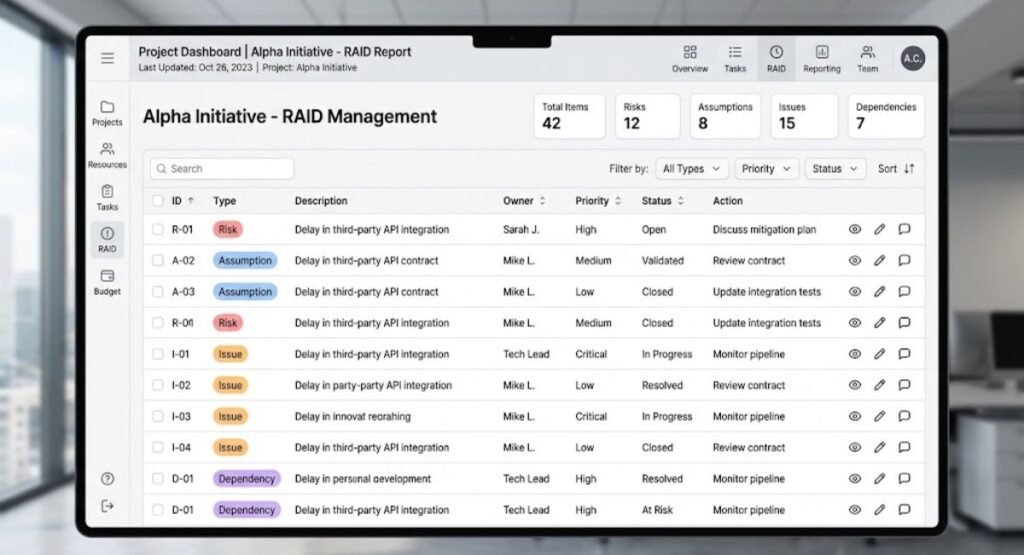
The following is a fictional example showing how four different categories can appear in one project register.
| ID | Type | Description | Owner | Priority | Status | Action |
| R-001 | Risk | Supplier delivery may be delayed | Procurement Lead | High | Open | Confirm delivery schedule |
| A-001 | Assumption | Design team will provide final files by the planned date | Project Manager | Medium | Under Review | Confirm availability |
| I-001 | Issue | Testing environment is currently unavailable | Technical Lead | High | Open | Restore environment |
| D-001 | Dependency | Development depends on approved design files | Product Lead | Medium | Open | Track design approval |
This example shows why separating the four categories can make project information easier to understand. Each item has a clear type, owner, priority, status, and action.
RAID Report Best Practices
A simple structure becomes more effective when the project team follows consistent practices.
- Keep entries specific: Describe the actual concern instead of using vague statements.
- Assign an owner: Every active item should have someone responsible for monitoring or managing it.
- Use clear status labels: Terms such as Open, In Progress, Under Review, and Closed can make tracking easier.
- Review regularly: Discuss important items during appropriate project meetings.
- Separate risks from issues: A potential future event is different from a problem that already exists.
- Record dependencies early: Identify important relationships between tasks and teams during planning.
- Close outdated items: Move completed or irrelevant items out of the active list where appropriate.
- Avoid unnecessary columns: Include information that supports project decisions and management.
- Use simple language: Entries should be understandable to both project teams and relevant stakeholders.
- Share relevant information: Make sure the people who need the information can access it.
- Link related items: Where useful, show relationships between a risk, issue, dependency, or related action.
Common RAID Report Mistakes
Even a well-designed register can become ineffective if it is poorly maintained.
- Creating the report but not updating it: Old information can quickly become misleading.
- Leaving items without owners: Unassigned responsibilities can delay follow-up.
- Confusing risks with issues: This can make responses less clear.
- Using vague descriptions: Unclear entries make it difficult to understand what needs attention.
- Recording too much irrelevant information: Excessive detail can make the document difficult to use.
- Ignoring dependencies: Untracked dependencies can create unexpected coordination problems.
- Failing to review overdue actions: An overdue response may require escalation or reassessment.
- Keeping the report hidden: Relevant stakeholders cannot act on information they cannot access.
The best approach is to keep the register focused, current, and connected to actual project management activities.
RAID Report Template
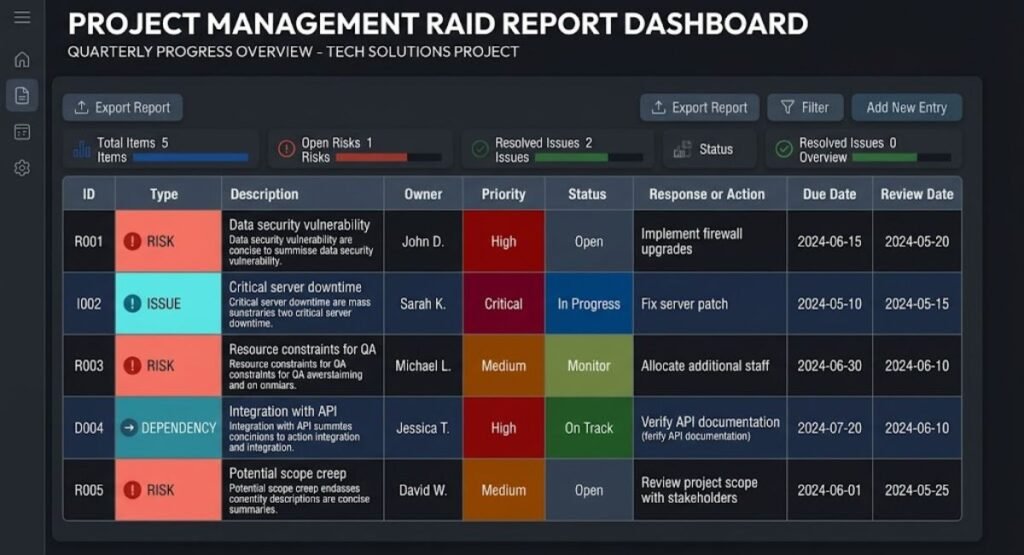
A reusable template can make project tracking more consistent. A basic structure can include:
| ID | Type | Description | Owner | Priority | Status | Response/Action | Due Date | Review Date |
| R-001 | Risk | |||||||
| A-001 | Assumption | |||||||
| I-001 | Issue | |||||||
| D-001 | Dependency |
Teams can adapt this structure by adding fields such as impact, probability, escalation status, or resolution date when those details are useful.
For a small project, fewer columns may be enough. For a complex project, additional information may help teams manage a larger number of items.
Who Should Use a RAID Report?
Different project roles can use the information for different purposes:
- Project Managers: Monitor major risks, issues, assumptions, and dependencies.
- Program Managers: Review concerns across multiple related projects.
- PMO Teams: Support consistent project reporting and governance.
- Business Analysts: Track assumptions, dependencies, and issues connected with requirements and processes.
- Project Coordinators: Maintain information and follow up on actions.
- Team Leaders: Monitor concerns affecting their teams or deliverables.
- Risk Managers: Review and monitor identified project risks.
- Project Sponsors: Review significant concerns that may require decisions or escalation.
- Stakeholders: Understand relevant project concerns and their current status.
Not every person needs every detail. The information shared should match the person’s role and project responsibilities.
About the Author
Zain UL Abideen is an SEO specialist and digital content professional who focuses on creating practical, easy-to-understand resources about technology, business, digital ideas, and project management.
Conclusion
A RAID report gives project teams an organized way to monitor risks, assumptions, issues, and dependencies in one place. By separating these four areas and recording useful information such as ownership, priority, status, and actions, teams can maintain a clearer view of important project concerns.
The most useful approach is to keep the information simple, accurate, and current. Regular reviews, clear ownership, and practical follow-up can make the document a useful part of project communication and ongoing project management.
(FAQs)
1. What is a RAID report?
A RAID report is a structured project-management document used to track risks, assumptions, issues, and dependencies.
2. What does RAID stand for in project management?
RAID commonly stands for Risks, Assumptions, Issues, and Dependencies.
3. What is the difference between a risk and an issue?
A risk is a possible future event, while an issue is a problem that has already occurred or is currently happening.
4. What should be included in a RAID report?
A RAID report should generally include the item type, description, owner, priority, status, action, and relevant review or due dates.
5. How often should a RAID report be updated?
It should be updated regularly and whenever an important risk, assumption, issue, dependency, status, or action changes.