
Projects involve many moving parts. Teams manage deadlines, stakeholders, vendors, resources, approvals, technical problems, and changing requirements at the same time. Without a clear way to track these factors, important concerns can become buried in meeting notes, emails, spreadsheets, or conversations.
A RAID report provides a structured way to bring important project concerns into one place. It commonly tracks Risks, Assumptions, Issues, and Dependencies, helping project teams identify what could affect delivery and determine who needs to take action.
This guide explains what a RAID report is, what each RAID category means, how to create one, which fields to include, how it differs from a risk register, and how teams can use it during regular project reviews.
What Is a RAID Report?
A RAID report is a project-management document that brings together important risks, assumptions, issues, and dependencies affecting a project.
Instead of tracking these items separately, a team can use a centralized RAID report to create a clearer view of the project’s current situation.
For example, a software implementation project might have:
- A vendor delivery risk
- An assumption about user availability
- An existing testing problem
- A dependency on security approval
The project team can record all four items in the RAID report, assign owners, define actions, and review progress regularly.
A RAID report works best as a living management document. Teams should update it as project conditions change rather than creating it once and leaving it untouched.
What Does RAID Stand For?
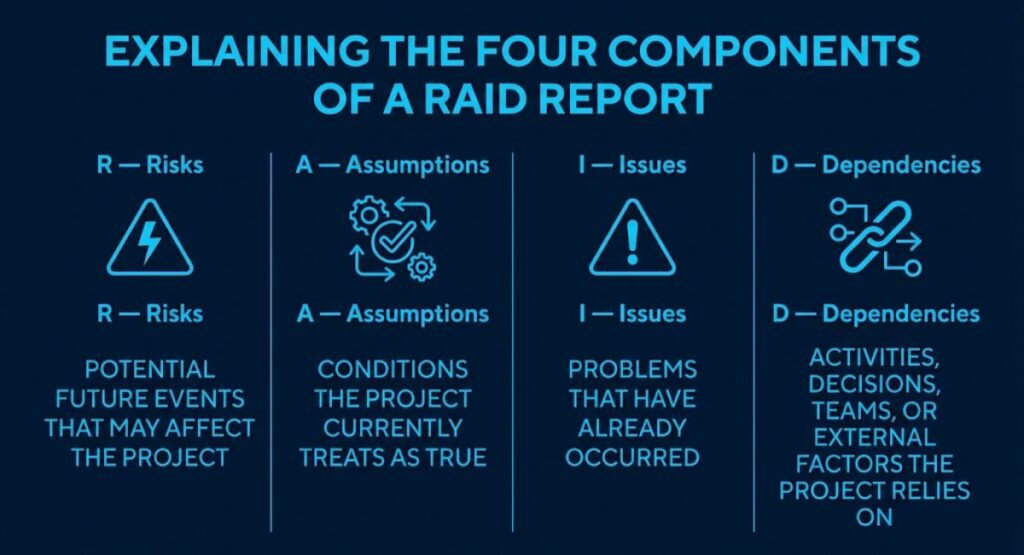
RAID commonly refers to:
| Letter | Meaning | What It Tracks |
| R | Risks | Potential events that could affect the project |
| A | Assumptions | Conditions the project currently treats as true |
| I | Issues | Problems that have already occurred |
| D | Dependencies | Things the project relies on |
The exact expansion can vary between organizations. Some teams use Actions or Decisions for one of the letters. Therefore, project teams should agree on the terminology they will use before starting their RAID process.
The important point is not the acronym alone. The real value comes from consistently identifying, assigning, monitoring, and managing the items recorded in the report.
Understanding the Four Components of a RAID Report
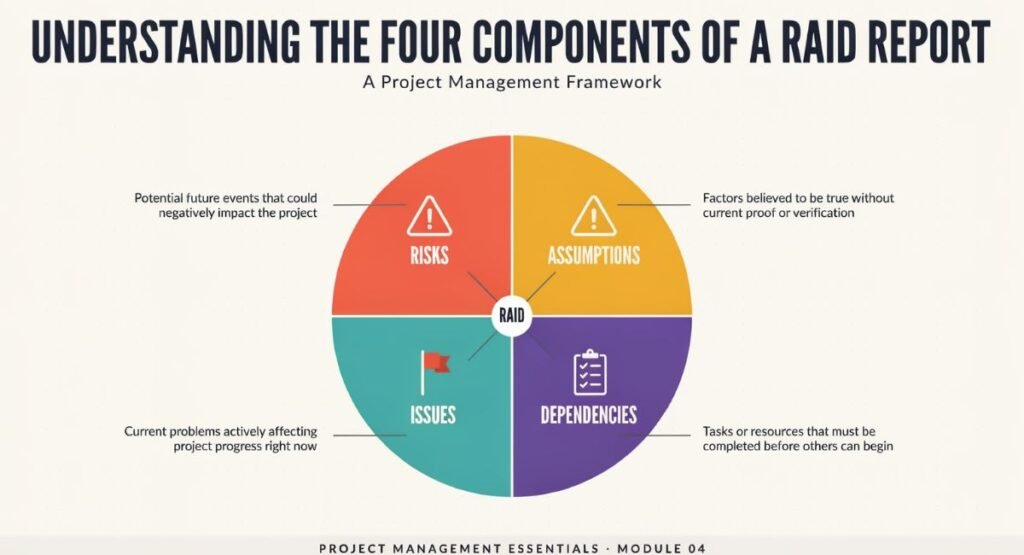
Risks
A risk is a potential event or condition that could affect a project in the future.
A risk has not necessarily happened yet. The team identifies it because it could create an unwanted outcome if it occurs.
A RAID report can help teams record and monitor risks, but risk management also requires a structured process for identifying, assessing, controlling, and reviewing risk. For a deeper explanation, see our guide to Composite Risk Management.
For example:
A third-party vendor may deliver a critical API later than planned.
The project team can assess the possible impact, assign an owner, define mitigation actions, and monitor the situation.
Common risk information includes:
- Risk description
- Probability
- Potential impact
- Risk owner
- Mitigation action
- Contingency plan
- Trigger
- Current status
The purpose is not to predict everything that could go wrong. Instead, the team should focus on meaningful uncertainties that require attention.
Assumptions
An assumption is something the project team currently accepts as true for planning or decision-making purposes.
For example:
The business team will provide the required data before the testing phase begins.
The team may plan the project based on this assumption. However, the assumption could prove incorrect.
Examples of project assumptions include:
- Required employees will remain available.
- Stakeholders will provide approvals on schedule.
- A supplier will meet agreed delivery dates.
- The required technology will remain available.
- Project funding will remain within the approved scope.
Teams should review key assumptions because an invalid assumption can create a risk or issue.
Issues
An issue is a problem that has already happened or currently exists.
For example:
The testing environment has been unavailable for three days, preventing the QA team from completing planned testing.
This is different from a risk.
A risk might say:
The testing environment may become unavailable.
An issue says:
The testing environment is currently unavailable.
This difference matters because the team normally manages the two situations differently.
| Risk | Issue |
| May happen | Has already happened |
| Represents uncertainty | Represents a current problem |
| Requires monitoring and mitigation | Requires resolution or corrective action |
| May have a contingency plan | Requires an action or resolution plan |
Dependencies
A dependency exists when one project activity, deliverable, decision, team, system, or external party relies on another.
For example:
The project cannot move into production until the security team approves it.
The production deployment depends on security approval.
Common project dependencies include:
- Vendor deliveries
- Legal approvals
- Security reviews
- Regulatory requirements
- Another team’s development work
- Infrastructure availability
- Stakeholder decisions
- Data migration
- External system integrations
Identifying dependencies early helps teams understand where delays could affect other activities.
What Should a RAID Report Contain?
A useful RAID report should contain enough information for project stakeholders to understand the item and determine what needs to happen next.
A practical structure can include the following fields:
| Column | Purpose |
| ID | Gives each item a unique reference |
| Type | Identifies the RAID category |
| Description | Explains the concern clearly |
| Date Raised | Shows when the item was identified |
| Owner | Identifies the person responsible |
| Priority | Shows the level of attention required |
| Status | Shows the current state |
| Response | Describes the planned action |
| Due Date | Establishes the target date |
| Next Review | Shows when the team should revisit the item |
| Related Item | Connects related risks, issues, or dependencies |
Not every project needs every column. A small project may need a simple tracker, while a large program may require more detailed governance information.
Every important RAID item should have a clear owner. When several people or departments are involved, a RASCI matrix can help clarify who is responsible, accountable, consulted, and informed.
The goal should always be clarity rather than unnecessary complexity.
Example of a RAID Report
Consider a software implementation project.
The project team might maintain a report like this:
| ID | Type | Description | Owner | Status | Response |
| R-001 | Risk | Vendor may delay API delivery | Project Manager | Monitoring | Confirm delivery milestones weekly |
| R-002 | Risk | Testing may require additional time | QA Lead | Open | Review test progress and capacity |
| A-001 | Assumption | Business team will provide data on time | Business Lead | Validating | Confirm data delivery date |
| I-001 | Issue | Test environment is unavailable | IT Lead | In Progress | Restore environment and investigate cause |
| D-001 | Dependency | Security approval is required before launch | Security Lead | Open | Schedule security review |
This example demonstrates why the RAID report is useful. It combines different types of project concerns into one structured view.
A Practical RAID Review Method
Simply creating a RAID report does not guarantee effective project management. Teams need a repeatable process for reviewing it.
A practical five-step approach is:
Identify → Classify → Assign → Act → Review
Step 1: Identify
Ask the project team:
- What could affect the project?
- What assumptions are we making?
- What problems exist now?
- What activities or decisions depend on something else?
Record meaningful items instead of documenting every minor concern.
Step 2: Classify
Place each item into the correct RAID category.
Ask:
- Could this happen in the future? → Risk
- Are we treating this condition as true? → Assumption
- Has the problem already happened? → Issue
- Does the project rely on another activity, decision, resource, or party? → Dependency
Correct classification makes the report easier to understand and manage.
Step 3: Assign
Give each important item an owner.
The owner does not necessarily need to solve the item personally. Their responsibility is to coordinate the required response and keep the item’s status current.
An item without clear ownership can remain unresolved because everyone assumes someone else will handle it.
Step 4: Act
Define the next action.
Risk: This could be mitigation.
Issue: It could be corrective action.
Assumption: It could be validation.
For a dependency, it could be coordination or escalation.
Avoid vague actions such as:
Monitor.
Instead, write a specific next step:
Confirm the vendor’s revised delivery date during the next supplier meeting.
Step 5: Review
Review active items at a frequency that matches the project’s needs.
During the review, ask:
- Has anything changed?
- Is the owner still correct?
- Is the action progressing?
- Has the due date changed?
- Has a risk become an issue?
- Has an assumption been validated?
- Has a dependency been resolved?
- Does the item need escalation?
This turns the RAID report from a passive spreadsheet into an active management tool.
RAID Report Case Study: A Software Project
Consider an illustrative software implementation project with several teams, an external vendor, and a planned launch date.
At the beginning of the project, the team records the following assumption:
The vendor will provide the required API documentation before integration testing.
The team also identifies a related risk:
Late API documentation could delay integration testing.
Later, the vendor misses the agreed documentation date.
The risk has now materialized into an issue.
The project team can update the RAID report to reflect the change:
Original assumption → Identified risk → Current issue → Corrective action
This relationship is important because project concerns can evolve.
A good RAID process should therefore allow teams to connect related entries instead of treating every row as an isolated record.
How to Create a RAID Report Step by Step
Step 1: Define the Project Scope
Before creating the report, understand:
- Project objectives
- Major deliverables
- Milestones
- Stakeholders
- Constraints
- Critical deadlines
- External parties
Without this context, the team may record items without understanding their significance.
Step 2: Identify Initial RAID Items
Hold a structured discussion with the project team.
Ask participants to identify:
- Potential risks
- Planning assumptions
- Current issues
- Important dependencies
You can also review project plans, schedules, requirements, contracts, and stakeholder feedback.
Step 3: Categorize Each Item
Make sure every item has the appropriate category.
If the classification is unclear, ask what the item actually represents.
For example, a delayed vendor delivery is an issue if the delay has already happened. If the vendor might be late but has not missed the deadline, it may be a risk.
Step 4: Assign an Owner
Every active item should have someone responsible for coordinating its management.
The owner should understand:
- What needs to happen
- Who needs to be involved
- When action is required
- When the item needs another review
Step 5: Define the Response
Record a practical response.
Examples include:
- Mitigate
- Resolve
- Validate
- Escalate
- Coordinate
- Monitor
- Accept
The response should match the nature of the item.
Step 6: Establish Review Dates
Set a review date for each active item where appropriate.
This prevents important concerns from remaining in the report without attention.
Step 7: Close or Archive Completed Items
When an item is resolved, update its status rather than simply deleting it.
Historical information can help teams understand:
- What happened
- What action solved it
- How long it remained open
- Whether similar problems could occur again
RAID Report vs Risk Register
A RAID report and a risk register are related, but they are not necessarily the same thing.
| Feature | RAID Report | Risk Register |
| Risks | Yes | Yes |
| Assumptions | Usually | May be tracked separately |
| Issues | Yes | Often tracked separately |
| Dependencies | Yes | Often tracked separately |
| Main purpose | Consolidated project visibility | Detailed risk management |
| Typical use | Project-level monitoring | Risk identification and response |
A RAID report can therefore provide a consolidated management view without replacing formal project-management records where those records are required.
For larger projects, the RAID report may sit alongside more detailed registers and governance documents.
Common RAID Report Mistakes
Treating Everything as a Risk
Not every project concern is a risk.
A problem that has already occurred should not remain classified as a potential future event.
Using Vague Descriptions
Weak description:
Communication issue.
Better description:
The product owner has not approved the requirements baseline by the agreed review date.
Specific descriptions help the team understand what needs attention.
Giving Everything the Same Priority
If every item receives the same priority, stakeholders cannot easily identify which matters require immediate attention.
Use a consistent approach to distinguish urgent matters from routine monitoring.
Not Assigning Owners
An item without ownership can remain open for too long.
Assign a clear owner who can coordinate the required response.
Creating the Report Once
A RAID report loses much of its value if the team creates it at project kickoff and never updates it.
Review active entries throughout the project.
Deleting Historical Items
Deleting completed items removes useful project history.
Instead, mark them as closed or archived according to your reporting process.
How to Measure RAID Report Health
Teams can introduce simple management metrics to understand whether their RAID process is working effectively.
These are proposed management measures rather than universal industry-standard formulas.
Owner Coverage
You can calculate:
Owner Coverage = Items With Assigned Owners ÷ Active RAID Items × 100
For example, if 18 of 20 active items have assigned owners:
18 ÷ 20 × 100 = 90%
This helps identify items that lack clear accountability.
Review Compliance
Another useful measure is:
Review Compliance = Items Reviewed on Schedule ÷ Items Due for Review × 100
This can show whether the team regularly reviews active RAID entries.
Additional Indicators
Teams can also monitor:
- Number of overdue items
- Number of items without next actions
- Number of risks that became issues
- Number of unresolved dependencies
- Number of assumptions still awaiting validation
- Average age of open issues
These measures should support project discussions rather than become reporting exercises for their own sake.
RAID Reports in Different Project Environments
A RAID report can also help program managers maintain visibility across multiple related projects. Program managers often coordinate risks, dependencies, resources, and stakeholders across a wider program, making structured RAID tracking particularly useful.
Agile Projects
Agile teams may use RAID tracking alongside sprint planning, reviews, retrospectives, and backlog management.
Examples include:
- External dependencies
- Technical blockers
- Vendor risks
- Unresolved decisions
- Environment problems
The team should avoid duplicating information that already exists in other systems unless the RAID report provides useful management-level visibility.
Waterfall Projects
Waterfall projects often involve formal phases, approvals, milestones, and stage gates.
A RAID report can help track:
- Approval dependencies
- Milestone risks
- Requirements assumptions
- Current issues
- Vendor commitments
IT Projects
Technology projects often involve complex dependencies between systems and teams.
Useful RAID entries may cover:
- Security approval
- Infrastructure availability
- API integration
- Data migration
- Testing environments
- Vendor support
- Production deployment
Construction Projects
Construction projects can also use structured RAID tracking for matters such as:
- Material availability
- Contractor dependencies
- Permit approvals
- Schedule risks
- Design assumptions
- Site issues
The specific fields and review process should match the project’s governance requirements.
RAID Report Best Practices
Keep Descriptions Clear
Write entries so someone outside the immediate discussion can understand them.
Assign Real Ownership
Use named roles or people according to your organization’s reporting standards.
Focus on Action
A RAID report should help the team decide what to do next.
Link Related Items
Connect assumptions, risks, issues, and dependencies when they influence each other.
Review Regularly
Set a consistent review process.
Escalate When Necessary
Some items require decisions beyond the project team’s authority.
Keep the Report Current
Close, update, or reclassify items as project conditions change.
Protect Sensitive Information
If the report contains commercially sensitive, personal, security-related, or confidential information, apply the organization’s access and data-handling requirements.
Multimedia Ideas for a RAID Report Guide
A comprehensive RAID guide can become more useful when visual content supports the written explanation.
RAID Framework Infographic
Create a four-part visual:
Risks → Assumptions → Issues → Dependencies
Place it near the beginning of the article.
RAID Lifecycle Diagram
Use this flow:
Identify → Classify → Assign → Act → Review → Close
This provides a quick visual explanation of the recommended workflow.
Example RAID Dashboard
A screenshot-style graphic can show:
- Open risks
- Active issues
- Pending dependencies
- Unvalidated assumptions
- Overdue actions
Short Explainer Video
A short video can explain the RAID concept using one fictional project example.
A useful sequence is:
- Introduce the project problem.
- Show four RAID categories.
- Add example entries.
- Show ownership and actions.
- End with the completed RAID view.
Downloadable RAID Template
A practical template can contain:
ID | Type | Description | Owner | Priority | Status | Response | Due Date | Next Review
A downloadable template can complement the article and give readers a practical way to apply the concepts.
About the Author
Zain UL Abideen is an SEO specialist and digital content professional who focuses on creating practical, research-based content around technology, business, project management, and digital solutions. Through Templorix, he works to simplify complex topics and turn them into clear, useful guides for professionals, students, and online readers.
His approach combines SEO best practices, structured research, and reader-focused writing to create content that is informative, practical, and easy to understand.
Conclusion
A RAID report gives project teams a structured way to monitor risks, assumptions, issues, and dependencies. Its value comes from more than putting information into a spreadsheet. Teams need to classify items correctly, assign ownership, define actions, and review the information consistently.
A practical RAID process follows a simple cycle: identify, classify, assign, act, and review. When teams connect related items and keep the report current, they can create better visibility into the conditions that may affect project delivery.
The best RAID report is not necessarily the longest one. It is the one that helps the project team understand what needs attention, who owns it, what action comes next, and when the team needs to review it again.
(FAQs)
What is a RAID report?
A RAID report is a project-management document that commonly tracks risks, assumptions, issues, and dependencies in one centralized view.
What does RAID stand for?
RAID commonly stands for Risks, Assumptions, Issues, and Dependencies, although some organizations use different meanings for the A or D.
What is the difference between a RAID report and a risk register?
A RAID report provides a broader consolidated view of project concerns, while a risk register focuses primarily on identifying and managing risks.
Who should maintain a RAID report?
The project manager or another designated project-governance owner can coordinate the report, while individual RAID items should have clearly assigned owners.
How often should a RAID report be updated?
Teams should review and update the report regularly based on the project’s complexity, governance requirements, and rate of change.